
Multiple Links in Image Captions: WordPress Image Source Separators Explained
How to split your image caption into multiple segments and link each of them individually.
You’ve found the perfect photo. But it doesn’t come from a single source – it has multiple “creators” or involved parties:
Maybe it’s a stock photo from a platform, but the original photographer needs to be credited. Or it’s an edited image where several people were involved. Or the licensing terms require you to link to multiple pages.
The result: You need multiple links in a single image caption.
How do you fit them all in without creating an unreadable mess?
This is where Image Source Control’s segment feature shines. It lets you split a caption into multiple linked sections, with each section pointing to a different source. Clean and organized.
A classic example is images from Wikimedia Commons, which often require linking to the photographer, the original file page, and the license. But the feature is useful for many scenarios.
Table of contents
The Four Separators
Image Source Control supports four ways to split image sources and their corresponding URLs:
Comma (,)
The simplest option. No additional space required before or after the comma.
Source text:
Photo by Alice Studio, Shared by Bob's Portfolio, Published on UnsplashSource URLs:
https://alicestudio.com, https://bobportfolio.com, https://unsplash.comCode language: JavaScript (javascript)Frontend result:
Photo by Alice Studio, Shared by Bob’s Portfolio, Published on Unsplash
Best for: Traditional lists, multiple contributors.
Pipe (|)
A modern, visually distinct separator. Space required after.
Source text:
Photographer | Content Creator | PlatformSource URLs:
https://example.com/photo | https://example.com/creator | https://platform.comCode language: JavaScript (javascript)Frontend result:
Photographer | Content Creator | Platform
Best for: Clean, modern designs. Less cluttered than commas.
Note: Foo|Bar without spaces is treated as a single source, not split due to missing space after the symbol.
Colon (:)
For hierarchical or categorical attribution. Space required after.
Source text:
Getty Images : News Division : Photographer ArchiveSource URLs:
https://gettyimages.com : https://gettyimages.com/news : https://gettyimages.com/photographersCode language: JavaScript (javascript)Frontend result:
Getty Images : News Division : Photographer Archive
Best for: Multi-level organizations, parent-child relationships.
Note: The colon in https:// is never treated as a separator, so your URLs stay intact.
Forward Slash (/)
A breadcrumb-style path. Space required after.
Source text:
Original Photographer / Image Editor / ArchiveSource URLs:
https://example.com/original / https://example.com/editor / https://example.com/archiveCode language: JavaScript (javascript)Frontend result:
Original Photographer / Image Editor / Archive
Best for: Workflow paths, sequential attribution chains.
Note: URL paths like /path/to/resource are never split—only visible separators with spaces count.
Mix & Match Separators
You can combine different separators in the same image caption for maximum flexibility:
Source text:
Photographer : Studio, License TermsSource URLs:
https://photographer.com : https://studio.com, https://creativecommons.org/licensesCode language: JavaScript (javascript)Frontend result:
Photographer : Studio, License Terms
All separators and their original spacing are preserved exactly as you enter them.
When a URL is Missing
What if you want to credit someone but don’t have a link for them?
Source text:
Photo by Alice, Edited by Bob, Published on UnsplashSource URLs:
https://alicestudio.com, , https://unsplash.comCode language: JavaScript (javascript)Frontend result:
Photo by Alice, Edited by Bob, Published on Unsplash
Leave the URL position empty, and that section displays as plain text. Perfect for giving credit when you don’t have a link or additional context.
Quick Reference
| Separator | Syntax | Spacing | Best For |
|---|---|---|---|
| Comma | A, B, C | No space required | Traditional lists |
| Pipe | A | B | C | Space required after | Modern, clean design |
| Colon | A : B : C | Space required after | Hierarchy, chains |
| Slash | A / B / C | Space required after | Breadcrumbs, sequences |
Pro Tip: Whitespace is Preserved
Leading and trailing spaces around your text are kept in the output:
Source text:
Photo by Alice , Edited by Bob Frontend result:
Photo by Alice , Edited by Bob
This gives you fine control over how tightly or loosely your caption elements sit together.
Note: For License Links, Use the License Feature
If you’re primarily linking to a Creative Commons license or usage terms, Image Source Control already has a dedicated Image Licenses feature. You can assign a license to each image without using separators:
- Configure your licenses in
Settings > Image Sources(?) > Image Licenses - The license link is automatically added to your caption or overlay
- No need to manually add it as a separate section
Learn more about the License feature
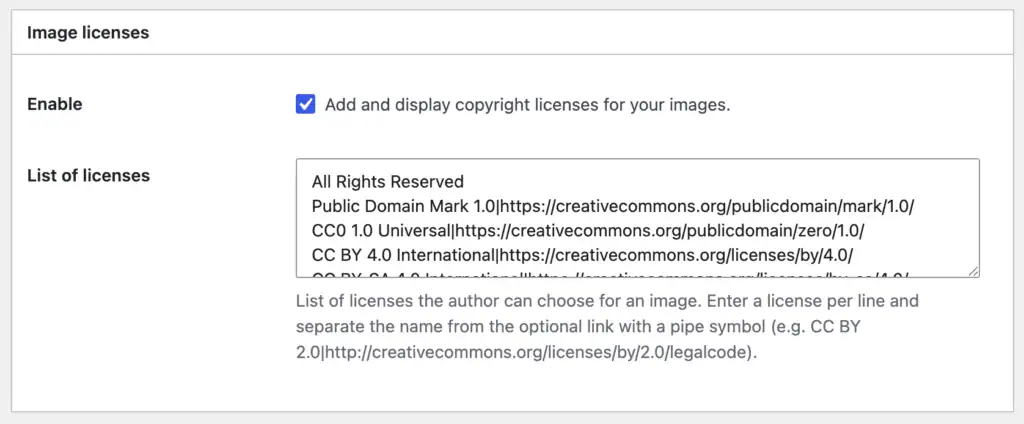
Separators are best for multiple human contributors or platforms, not for legal license links, as ISC handles those separately.
Using This in Image Source Control
Whether you’re editing in the Block Editor or Media Library, just paste your multi-section source and URL into the respective fields. ISC automatically detects the separators and creates the linked sections in the image caption for you.
Not Using Image Source Control Yet?
If you’re managing image attributions manually—or worse, tracking multiple contributors in your head—you’re risking inconsistencies and legal issues.
Image Source Control handles all the heavy lifting: centralized credit management, bulk editing, automatic overlays, multiple links per image, and removing unused images across your entire site.
The separator feature is just one of many ways ISC makes complex attributions flexible and effortless.

Questions? Feedback? How can I help?
Reach out directly via the contact form.